Skip to content
To split a 100G port into four independent 25G ports, the key lies in the coordination of three aspects: physical cable connection, device software configuration, and fiber polarity rules. This is a very mature and efficient approach in the “spine-leaf” network architecture of data centers.
The specific implementation steps are as follows:
Step 1: Prepare hardware – what do you need?
To achieve a 100G to 4x25G breakout, you need to prepare the following things:
| Component | Explanation and Requirements |
| 100G main equipment | The QSFP28 port of a switch or network card must explicitly support the “Breakout” function. This is a prerequisite for implementing branches. |
| Breakout cable | This is the key to physical connectivity. You need a dedicated QSFP28 breakout 25G cable with QSFP28 interface on one end and four independent SFP28 interfaces on the other end. |
| 4x 25G terminal devices | The interface of each server or switch needs to be SFP28, and the corresponding 25g transceiver or 100G QSFP28 to 4x25G SFP28 cable should be inserted. |
Step 2: Configure the device – how to enable breakout mode?
After the hardware is connected, the most crucial step is to configure the software on the main device. When the device leaves the factory, the 100G port works as a whole interface by default. If the branch mode is not turned on, only the first branch port (channel 0) will light up, and the other three ports cannot be used.
For switches:
You need to log in to the command line interface (CLI) or web management interface of the switch. In the port management menu, locate the target QSFP28 port and change its mode from “100G” to “4x25G” or similar Breakout mode. After saving the configuration, the port will become four independent logical interfaces. Different brands have different commands, for example:
- Dell SONiC/OS10:
interface breakout 1/1 map 25g-4 - Cisco NX-OS:
interface breakout slot/port map 25g-4 - Arista EOS:
platform petra port 1/1-4 speed 25g
Note: Not all switch ports support Breakout mode, please refer to the device manual; After changing the port mode, some systems may need to restart the relevant business cards or save the configuration to see the generated 4 sub interfaces (such as Eth1/1/1 to Eth1/1/4).
For server network cards:
Taking VNet NAS as an example, you need to find the network card in the “Network and Virtual Switch” settings of the operating system, and then manually select the branch mode and save it in the “Mode Configuration”.
Step 3: Hardware Connection Plan – How to Connect?
There are usually three physical connection methods based on transmission distance and cost requirements for breaking out a 100G port into 4 x 25G ports:
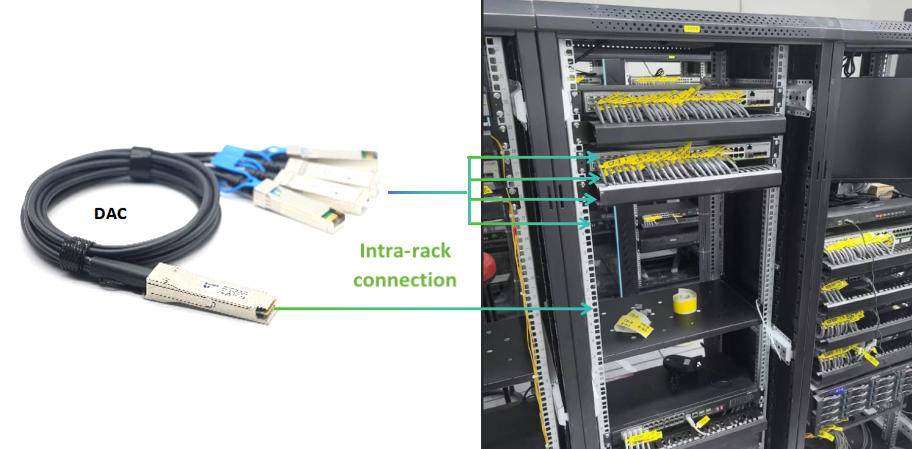
Solution 1 – 100G DAC Cable (100G QSFP28 to 4x25G SFP28 DAC)
Applicable: Short distance connections within the same rack (within 3-5 m).
Advantages: QSFP28 direct attach cable is the lowest cost, extremely low power consumption, plug and play.
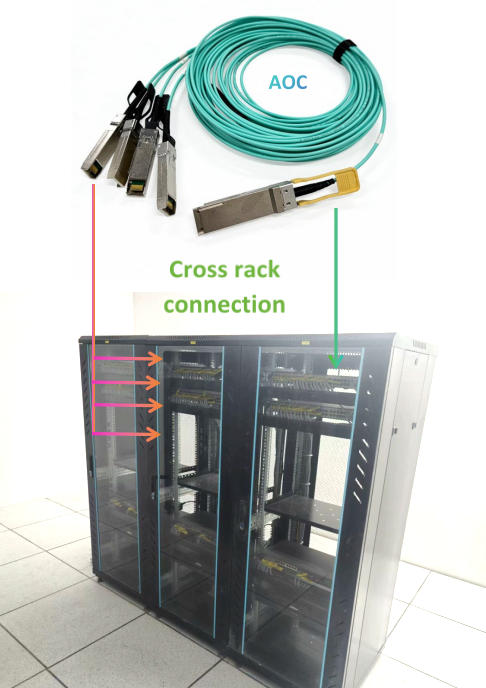
Solution 2 – AOC Breakout Cable (100G QSFP28 to 4x25G SFP28 AOC)
Applicable: Cross rack connection (1 m -70 m/100 m).
Advantages: AOC 100G QSFP28 cable is more lightweight than QSFP28 DAC cable, and longer transmission distance (up to about 100 meters), but relatively higher cost.
Solution 3 – Optical Module+ MPO 12 Breakout Cable (MPO to 4xLC)
Applicable: Existing wiring structures or more flexible deployments.
Essential hardware:
- 100G QSFP28 SR4 or PSM4 optical module ( it must be a module that supports parallel transmission, LR4 and other wavelength division multiplexing modules usually do not support branching).
- MPO-4xLC breakout cable
- 4x SFP28 25G transceivers.

Step 4: Understand the working principle – fiber polarity matching
The interior of the 100G SR4 optical module essentially encapsulates four 25G physical channels (Lane) together. The function of the branch cable is to split the four independent channels inside the module into four LC duplex connectors through one MPO connector. In a standard 12 fiber MPO connector, the mapping relationship for fiber allocation is as follows:
| Breakout port number | Fiber pair used (MPO guide pins) |
| 25G port 1 | Fiber 1 (transmitter) & Fiber 12 (receiver) |
| 25G port 2 | Fiber 2 (transmitter) & Fiber 11 (receiver) |
| 25G port 3 | Fiber optic 3 (transmitter) & Fiber optic 10 (receiver) |
| 25G port 4 | Fiber 4 (transmitter) & Fiber 9 (receiver) |
Note: The middle fibers 5-8 are not used. That’s why an MPO cable can split into 4 independent LC fibers, and the polarity of the cable is required to be “Method B” (i.e. one end Key up, the other end Key down) to ensure corresponding transmission and reception.
Important Notice
- Interrupt operation: Changing the port mode will cause all traffic on that port to be interrupted. It is recommended to perform the operation during the maintenance window period.
- Check cables: When purchasing branch cables, please confirm that they clearly support “100G to 4x25G Breakout” and that the interface type (multimode/single-mode) and transmission distance meet your needs.
- Module type matching: If SR4 (multi-mode parallel) is used on the 100G end, the 25G end must also use the SFP 25G SR module; If 100G is PSM4 (single-mode parallel), then a 25G SFP28 LR module is required for the 25G end.
- FEC setting: The 25G link usually requires FEC (Forward Error Correction) to be enabled for normal up. Please ensure that the FEC mode (such as Base-R FEC or RS-FEC) of both devices remains consistent.